Rollback
Going back to the last version that worked when a new one causes problems.
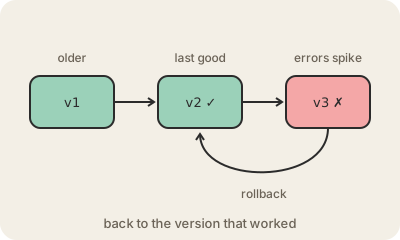
A rollback is undoing a change by returning a system to an earlier state that was known to be good. The most common case is software releases: a team publishes version 3 of an app, error reports start pouring in, and instead of hunting for the bug while users suffer, they put version 2 back. The investigation can happen calmly afterwards.
A fast rollback is one of the best safety nets a team can have, and modern tooling makes it routine. Kubernetes keeps the previous versions of a deployment and can return to one with a single command. Cloud deployment services can roll back on their own when health checks or alarms fail. Release styles like canary releases and blue-green deployments are designed partly so that going back is quick and only a few users notice the problem.
The hard part is usually data. Code can be swapped back in seconds, but if version 3 changed the database, for example by renaming a column, version 2 may no longer understand it. That is why careful teams make database changes in small, backward-compatible steps. Sometimes rolling back is not possible or not worth it, and the team "rolls forward" instead with a quick fix. The word is also used for databases: a transaction that fails is rolled back, so none of its changes are kept.
Keep in mind
- Returns a system to the last version known to work.
- Fixes the symptom fast; the root cause is investigated afterwards.
- Database changes are what usually make rolling back hard.
- In databases, a failed transaction is rolled back so nothing half-done is kept.
Go deeper
- Rolling back a Deployment (Kubernetes docs)
- Redeploy and roll back a deployment with CodeDeploy (AWS docs)
- Rollback (data management) on Wikipedia