Mobile hotspot
Your phone turned into a small Wi-Fi router that shares its mobile data.
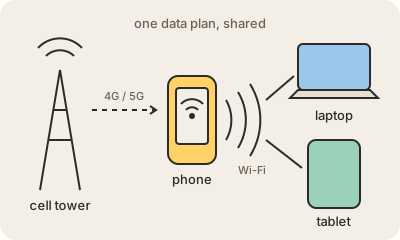
A mobile hotspot is a phone feature that shares its mobile data connection with other devices. The phone keeps talking to the cell tower over 4G or 5G and, at the same time, creates its own small Wi-Fi network. Your laptop or tablet joins that network as if it were the one at home, and its traffic goes out through the phone.
On iPhone it is called Personal Hotspot; on Android it is usually under Hotspot and tethering. The same thing can be done with a USB cable or Bluetooth, which is what tethering originally meant. There are also small dedicated devices, often called MiFi, that do only this job and take their own SIM card.
It is the quickest fix when the café Wi-Fi fails or you need to work on the road. The costs: it drains the phone's battery, everything the laptop downloads counts against your data plan, and some plans limit or charge extra for sharing. Give the network a strong password, the same as you would at home.
Keep in mind
- The phone gets internet over 4G or 5G and re-shares it over Wi-Fi, USB or Bluetooth.
- Everything the connected devices use comes out of your mobile data plan.
- It drains the phone's battery quickly; plugging it in helps.
- Protect it with a strong password like any Wi-Fi network.
Go deeper
- Set up a Personal Hotspot on iPhone (Apple Support)
- Share a mobile connection by hotspot or tethering on Android (Google)
- Tethering on Wikipedia