Captive portal
The page that pops up on public Wi-Fi asking you to log in or accept terms first.
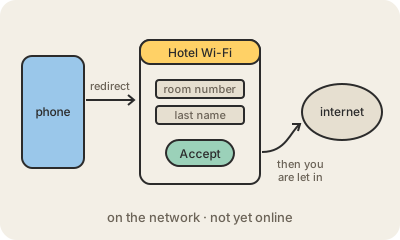
A captive portal is the web page you see when you join the Wi-Fi at an airport, hotel, café or hospital and it asks for your room number, an email address, a code from your ticket, or just a tap on "Accept". Until you get past it, you are connected to the network but not to the internet: you are held "captive" on that one page.
Behind the scenes, the network's gateway lets your device in but blocks or redirects all your traffic. Phones and laptops detect this on their own: right after joining, they try to load a known test address (Apple, Google and Microsoft each have one). If the answer is not what they expect, they conclude there is a portal and open a small login window automatically. Once you accept, the gateway remembers your device, usually by its MAC address, and lets your traffic through for a while.
Captive portals are useful to venues: they can show terms of use, charge for access, limit time, or collect an email for marketing. They are also a weak spot. The page itself is often not protected by HTTPS, and anyone can set up a fake hotspot with a convincing login page to steal passwords. A good habit is never to type an important password into a Wi-Fi login page, and to use a VPN on public networks when you can.
Keep in mind
- Common on airport, hotel and café Wi-Fi.
- You are on the network but cut off from the internet until you log in or accept.
- Devices detect it by loading a test page and open the login window automatically.
- Fake portals are an easy phishing trick; do not reuse real passwords there.
Go deeper
- Captive portal on Wikipedia
- RFC 8910, Captive-Portal Identification in DHCP and Router Advertisements