CGNAT
NAT done by your provider, so many customers share one public IP address.
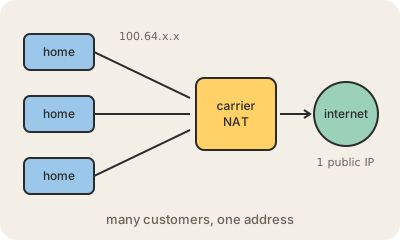
At home, your router uses NAT to share one public IP address among all your devices. CGNAT (carrier-grade NAT) adds a second layer of the same trick inside your internet provider. Your router no longer gets a public address; it gets a private one from the provider, and the provider's big NAT boxes share each public IPv4 address among many customers at once.
Providers do it because IPv4 addresses ran out and buying more is expensive, while the number of customers, especially on mobile networks, keeps growing. A special range, 100.64.0.0/10, was reserved in 2012 (RFC 6598) for the addresses between the customer and the carrier NAT, so they do not clash with the 192.168.x.x addresses inside homes. If your router's WAN address starts with 100.64 to 100.127, you are almost certainly behind CGNAT.
For browsing and streaming you will not notice. The problems appear when someone outside needs to reach you: you cannot open ports to host a game server, a security camera or remote access, and some peer-to-peer apps and online games struggle. Because many people share one address, a block or ban aimed at one abusive user can hit all of them. Common ways out are asking the provider for a public IP (sometimes for a fee), using IPv6, or a tunnel or VPN service.
Keep in mind
- A second layer of NAT run by the provider, sharing public IPv4 addresses among many customers.
- Uses the reserved range 100.64.0.0/10 between the customer and the carrier.
- Breaks port forwarding and hosting anything reachable from outside.
- Ways around it: request a public IP, use IPv6, or use a tunnel.
Go deeper
- Carrier-grade NAT on Wikipedia
- RFC 6598: IANA-Reserved IPv4 Prefix for Shared Address Space
- RFC 6888: Common Requirements for Carrier-Grade NATs