LAN and WAN
A LAN connects devices in one place; a WAN connects places far apart.
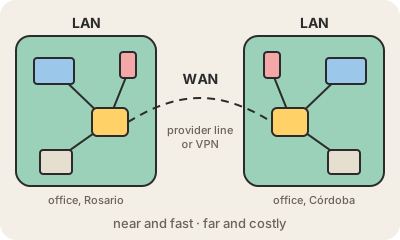
A LAN (local area network) is the network inside one place: your home, an office floor, a school. The laptop, the printer, the smart TV and the phones are all connected, by Wi-Fi or Ethernet cables, to the same router or switch. Inside a LAN, devices can talk to each other directly and very fast, which is why you can print from your phone or send a video to the TV without going out to the internet.
A WAN (wide area network) connects networks that are far apart: two branches of a bank in different cities, a hospital and its clinics, a company's offices on three continents. The links usually run over lines rented from a telecom provider, or over the internet itself protected by a VPN. Slower and more expensive per gigabyte than a LAN, a WAN is what turns separate sites into one organization's network.
The internet is, in a sense, the biggest WAN of all: millions of LANs joined together. At home, your router sits right on that border. One side faces your LAN, with private addresses like 192.168.0.10; the other side, often labeled WAN on the router itself, faces your internet provider.
Keep in mind
- LAN: devices in one home, office or building, connected by Wi-Fi or Ethernet.
- WAN: links between distant sites, usually over a provider's lines or a VPN.
- LANs are fast and cheap; WANs cover distance at a higher cost.
- The WAN port on a home router is the side that faces the internet.