Web accessibility
Making websites and apps usable by everyone, including people with disabilities.
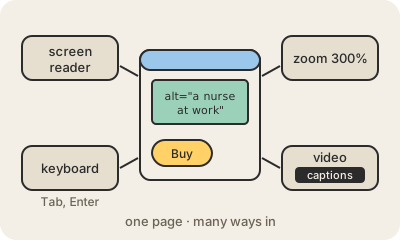
Web accessibility means building sites so that people can use them however they perceive and operate a computer. A blind person uses a screen reader, software that reads the page aloud; someone with a tremor may navigate only with the keyboard; a deaf person needs captions on videos; someone with low vision zooms the page to 300%. An accessible site works for all of them.
Much of it is careful, ordinary work. Every image gets alt text describing it ("a nurse checking a patient's blood pressure"). Buttons are real buttons in the HTML, not decorated boxes, so a keyboard and a screen reader can find them. Text has enough contrast against its background. Forms say in words what went wrong, not only in red. Nothing important depends on color, sound or a mouse alone.
The reference rulebook is WCAG, the Web Content Accessibility Guidelines from the W3C, and many laws point to it: the European Accessibility Act, the ADA in the United States and similar rules in Latin America. Beyond the law, it helps far more people than expected: older users, anyone on a phone in bright sunlight, someone with a broken arm. The community often shortens the word to a11y (an "a", 11 letters, a "y").
Keep in mind
- Covers blindness, low vision, deafness, motor and cognitive disabilities.
- Basics: alt text, real HTML buttons and labels, keyboard access, good contrast, captions.
- WCAG is the international reference, and many laws require it.
- Helps everyone, not only people with permanent disabilities.