UX and UI
UI is what you see and touch on a screen; UX is how the whole experience feels.
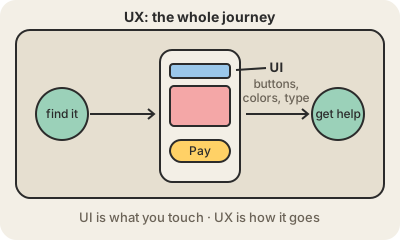
UI, the user interface, is the part of a product you see and touch: screens, buttons, menus, icons, colors, fonts, the little animation when you tap "send". UI designers decide how each screen looks and how its pieces behave, often in tools like Figma, and hand those designs to developers.
UX, the user experience, is broader: how it feels to get something done with the product from start to finish. Can you find the right button? Does booking a doctor's appointment take three steps or twelve? Are error messages clear? What happens when you need help? UX designers interview users, map their journeys, build rough prototypes and watch real people try them, then change what confuses them.
The two overlap and are often one job title ("UX/UI designer"), but they can fail separately. A banking app can look gorgeous and still make transferring money a maze: good UI, bad UX. A plain government form can be ugly and still get you through in two minutes: modest UI, good UX. Accessibility, writing clear labels and choosing what to leave out are all part of the craft.
Keep in mind
- UI: the visual and interactive layer, screens, buttons, type and color.
- UX: the whole journey of getting a task done, and how it feels.
- UX work relies on research and testing with real users.
- Beautiful UI does not guarantee good UX, and vice versa.
Go deeper
- The Definition of User Experience (Nielsen Norman Group)
- User experience design on Wikipedia
- User interface on Wikipedia