Thunderbolt
A very fast port that carries data, video and power over one USB-C cable.
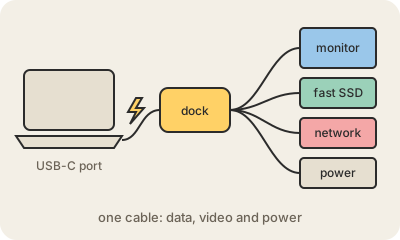
Thunderbolt is a high-speed connection standard created by Intel, first launched with Apple in 2011. Since Thunderbolt 3 it uses the same oval USB-C connector as regular USB, so the port looks identical; the usual hint is a small lightning-bolt icon next to it. What changes is what travels through the cable: it can carry fast data, one or more displays and power at the same time.
The trick is that Thunderbolt tunnels the computer's own internal links outside the case. It carries PCIe, the same connection the computer uses for graphics cards and SSDs, and DisplayPort for screens. That is why an external drive over Thunderbolt can perform close to an internal one, and why one cable to a dock can power your laptop, drive two monitors and connect a keyboard, network and storage at once. Thunderbolt 3 and 4 reach 40 Gbit/s; Thunderbolt 5 doubles that to 80 Gbit/s.
The catch is the confusion with USB-C. A USB-C port might be plain USB, USB with video, or full Thunderbolt, and cables vary too. The good news is that recent versions of USB4 are built on Thunderbolt technology, so the two are converging. If you rely on fast storage or a single-cable desk setup, check that both the port and the cable say Thunderbolt.
Keep in mind
- Made by Intel; since Thunderbolt 3 it uses the USB-C connector.
- Carries PCIe data, DisplayPort video and power in one cable.
- Thunderbolt 3 and 4 reach 40 Gbit/s; Thunderbolt 5 reaches 80 Gbit/s.
- Look for the lightning-bolt icon: not every USB-C port is Thunderbolt.