PCIe
The fast internal highway that connects graphics cards and SSDs to the CPU.
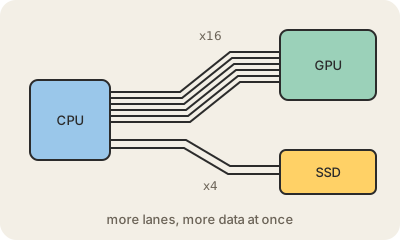
PCIe (PCI Express) is the main connection inside a computer for fast components. Graphics cards, NVMe SSDs, network cards and many other add-ons talk to the CPU over it. On a desktop motherboard you can see it as the long slots where a GPU plugs in; in a laptop the same links exist, just soldered or hidden under a small M.2 slot.
PCIe is built from lanes. Each lane is a pair of tiny two-way data paths, and a device gets a bundle of them: x1, x4, x8 or x16. A graphics card usually takes x16, the widest; an NVMe SSD usually takes x4. More lanes means more data at once, like adding lanes to a road. A CPU has a limited number of lanes to hand out, which is one of the real differences between consumer and workstation or server chips.
Since its first version in 2003, each new PCIe generation has roughly doubled the speed per lane, and devices work across generations at the speed of the slower side. That steady doubling is part of why storage got so fast: a modern SSD on PCIe moves data many times faster than old drives on SATA. In data centers, how many lanes and which generation a server offers decides how many GPUs and fast drives it can feed.
Keep in mind
- Connects GPUs, NVMe SSDs and other fast parts to the CPU.
- Links are bundles of lanes: x1, x4, x8, x16.
- Each generation has roughly doubled the speed per lane.
- Generations are compatible; a link runs at the speed of the slower side.