Jitter
How much the delay of a connection jumps around from one packet to the next.
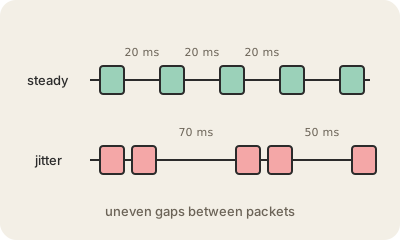
Latency is how long a packet takes to cross the network. Jitter is how much that time varies. If packets arrive every 20 milliseconds like clockwork, jitter is close to zero. If one takes 20 ms, the next 70 ms and the next 15 ms, the connection is jittery, even if the average latency looks fine.
Jitter comes from the same places as congestion: packets waiting in router queues that fill and empty, a Wi-Fi network shared with many devices, a route that changes mid-call, or someone in the house starting a big upload. Each packet meets a slightly different wait, so they arrive unevenly and sometimes out of order.
For a download, jitter barely matters. For live audio and video it does, because the sound has to be played at a steady pace. Calling apps use a jitter buffer: they hold incoming packets for a moment and release them evenly, trading a little extra delay for smooth sound. When jitter is bigger than the buffer, you hear choppy audio or robotic voices. Speed tests often report jitter in milliseconds next to ping, and a wired connection usually lowers it.
Keep in mind
- Jitter is the variation in latency, not the latency itself.
- Caused by changing queues, busy Wi-Fi and shifting routes.
- Hurts calls, video and games; downloads barely notice.
- A jitter buffer smooths it out at the cost of a little extra delay.