EDR
Security software that watches what each computer does and reacts to signs of attack.
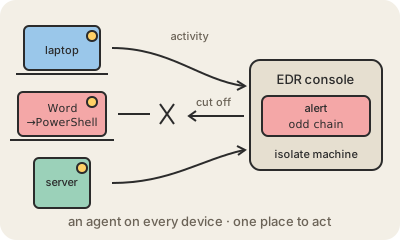
EDR stands for endpoint detection and response. An endpoint is any device people or programs work on: laptops, desktops, servers. EDR is a small program, an agent, installed on each of them. It records what happens in detail, which processes start, which files change, which network connections open, and sends that stream to a central console where software and analysts look for signs of an attack.
The difference with a classic antivirus is the focus on behavior. Antivirus mainly asks whether a file matches known malware. EDR asks whether a sequence of events makes sense: why did a Word document just launch PowerShell, which then downloaded something and started encrypting hundreds of files? Attackers often use legitimate tools already on the machine, so judging behavior catches things a file scan misses.
The response part matters as much as the detection. From the console, a security team can isolate a laptop from the network with one click, kill a process, delete a file, or go back in the recorded history to see how the intruder got in. Products such as CrowdStrike Falcon, Microsoft Defender for Endpoint and SentinelOne are common in companies, and they feed alerts to the security operations center. Because EDR runs with deep access to the operating system, a bad update can do real damage: in July 2024 a faulty CrowdStrike update crashed millions of Windows computers worldwide. XDR (extended detection and response) widens the same idea to email, cloud and network data.
Keep in mind
- An agent on each device records processes, files and connections.
- Detects suspicious behavior, not only known malicious files.
- Can isolate a machine, kill processes and replay what happened.
- XDR extends the idea beyond endpoints to email, cloud and network.