Progressive web app
A website that can be installed and used like an app, even offline.
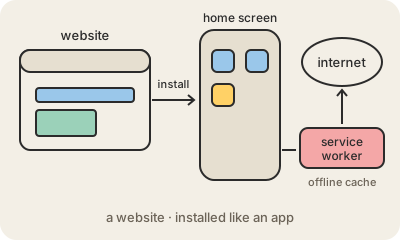
A progressive web app (PWA) is a website built so it can behave like an installed app. You visit it in the web browser, tap "Add to home screen" or "Install", and from then on it opens from its own icon, in its own window, without the address bar. Underneath it is still HTML, CSS and JavaScript served from a URL.
Two pieces make that possible. A web app manifest is a small JSON file with the app's name, icon and colors, which tells the device how to install it. A service worker is a script the browser runs in the background, between the page and the network: it can keep copies of files and data in a cache so the app opens without signal, and it can receive push notifications. PWAs must be served over HTTPS.
The appeal is one codebase for every device, no app store review, and updates that arrive the next time the user opens it. Twitter, Starbucks and Uber have all shipped PWAs, often to reach people with cheap phones or patchy data. The limits are real too: iPhones support PWAs with fewer features than Android, and some hardware access is still easier from a native mobile app.
Keep in mind
- A website that can be installed to the home screen and opened in its own window.
- The manifest describes the app; the service worker handles offline caching and notifications.
- Requires HTTPS and updates like a website, without an app store.
- Support varies: iOS offers fewer PWA features than Android and desktop browsers.