Hostname
The human-readable name a device uses on a network.
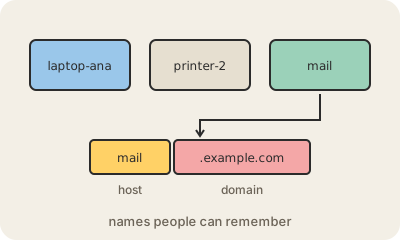
Every device on a network has an IP address, but numbers are hard to remember. A hostname is the name a device goes by instead: laptop-ana, printer-2, db01. You choose it when you set up a computer, and you can see it on your own machine by typing hostname in a terminal.
On the internet, hostnames sit inside domain names. In mail.example.com, mail is the host and example.com is the domain it belongs to; written out in full, the whole thing is called a fully qualified domain name (FQDN). DNS translates that name into an IP address, so a company can move its mail server to a new machine and only update DNS, while everybody keeps typing the same name.
Hostnames have simple rules: letters, digits and hyphens, with each part up to 63 characters. They show up in many places you might not expect: in your router's list of connected devices, in log files, in error messages, and in the certificates that make HTTPS work, which are issued for specific hostnames. Picking clear, consistent names is a small habit that makes a network much easier to manage.
Keep in mind
- A readable name for a device, alongside its IP address.
- In mail.example.com, mail is the host and example.com the domain.
- DNS turns hostnames into IP addresses.
- Allowed characters: letters, digits and hyphens; up to 63 per part.